
We’ve all seen it. The blurry profile picture, the cropped carousel post, the Reel with black bars on the sides. You create what you think is a great piece of content, but by the time you post it, it looks unprofessional and lazy.
It’s a simple mistake, but it’s one that can instantly kill your content’s quality and make your brand look amateur. In a world where first impressions are everything, you can’t afford to have a sloppy visual presence. The good news is, this is an easy fix.
The Instagram algorithm is smart, but it can’t fix your photos for you. If you upload a post with the wrong dimensions, it will be automatically cropped and compressed, killing its quality and hurting your chances of getting seen.
The truth is, if you want to grow on Instagram, you have to treat it like a professional platform. And that means creating content that looks amazing.
In this guide, we’re going to give you the ultimate cheat sheet for every Instagram image size, from posts to Reels, so you can create high-impact visuals that get noticed and make your brand look like a million bucks.
Why Image Sizes Matter
Think of your Instagram profile like a high-end restaurant. Everything has to be perfect. The food has to be delicious, the service has to be amazing, and the presentation has to be flawless. If a dish comes out looking sloppy, it doesn’t matter how good it tastes—it instantly loses its appeal.
Your content is no different. You can have the best idea, the most valuable information, and the most compelling story, but if the image is blurry, stretched, or poorly cropped, it instantly loses its impact.
The simple reason image sizes matter so much is that they are a signal of your professionalism and attention to detail.
When you take the time to create content with the correct dimensions, you’re telling your audience and the algorithm that you’re a professional. That you care about your brand. That you’re not just posting for the sake of it.
The algorithm is a visual beast. It sees every image and video as a quality signal. It knows when a piece of content is pixelated or improperly sized. And while it might not penalize you directly, it’s not going to favor content that looks like it was created in a hurry.
On the flip side, when you consistently post high-quality, perfectly sized visuals, the algorithm takes notice. It sees that you’re creating a high-quality experience for your audience and rewards you with more reach. It’s a simple, non-negotiable step that separates the amateurs from the pros.
The Ultimate Cheat Sheet: Your Go-To Guide for Every Image Size
This is the part you’ve been waiting for. Stop guessing. Stop hoping for the best. This is your definitive guide to the perfect dimensions for every piece of content you post on Instagram. Save this for later—you’ll need it.
1. Instagram Post: The Perfect Square and Beyond
The classic Instagram post. While the square is still a good option, Instagram now supports a variety of aspect ratios. Using them correctly is a simple way to make your content stand out.
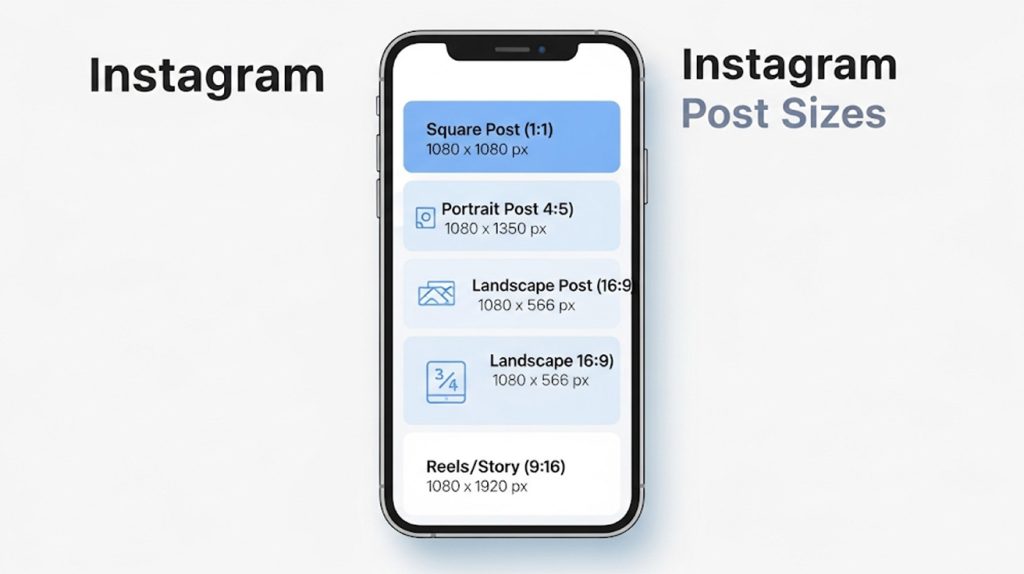
- Square Post: 1080px by 1080px. This is the safest, most reliable option. It will look perfect on your feed and on your profile grid.
- Portrait Post: 1080px by 1350px. This is your secret weapon. A portrait-style post takes up more screen real estate, which means it grabs more attention and gives you more space for your message. This is the best format for carousels and posts that have a lot of text.
- Landscape Post: 1080px by 566px. Use this sparingly. A landscape post takes up very little screen space, which means it’s easy for people to scroll right past. Use this only when it’s absolutely necessary, like for a specific photo or a video that looks best in this format.
2. Instagram Reels & Stories: How to Dominate the Vertical Feed
The vertical feed is where the growth is happening right now. Don’t get caught posting blurry, low-quality videos.
- Reels and Stories: 1080px by 1920px. This is the non-negotiable, full-screen, vertical format. The key here is to make sure your important content—your text and your visuals—are in the “safe zone” so they don’t get covered by your username, the caption, or the sound button.
3. Profile Picture: Making a Memorable First Impression
Your profile picture is the first thing people see when they land on your page. Make it count.
- Profile Picture: 320px by 320px. Instagram will display it at 110px by 110px on the app, but you need to upload a high-resolution version to ensure it looks crisp. Make sure your face is centered and easy to see.
By using these dimensions, you’re not just creating a great piece of content. You’re creating a high-impact visual that is designed to get noticed and make your brand look like a pro.
The Payoff: More Than a Number
You’ve got the cheat sheet. You know the dimensions. But why does this all matter? Because a well-sized image is a powerful signal of your professionalism and attention to detail. It’s the difference between a brand that looks like a hobby and a brand that looks like a business.
Think of it like this: every single pixel of your content is a reflection of your brand. If your content is blurry, stretched, or poorly cropped, it sends a subconscious message to your audience that you’re not a professional. But when you consistently post high-quality, perfectly sized visuals, you build an instant trust and authority.
When you use the right dimensions, you’re not just making your content look good. You’re making it work harder for you. A perfectly sized portrait post takes up more screen real estate, which means it grabs more attention. A high-quality Reel has a better chance of being pushed to the Explore page.
It’s a simple, non-negotiable step that separates the amateurs from the pros. It’s the difference between a brand that struggles to get noticed and a brand that looks like a million bucks.
Conclusion: Stop Guessing. Start Looking Like a Pro.
You now have the ultimate cheat sheet for Instagram image sizes. It’s time to stop guessing and start creating content that is designed to get noticed.
Every time you post, remember to use these dimensions. It’s a simple, actionable step that will make a huge difference in the quality of your content and the perception of your brand.
Ready to start looking like a pro? Drop a “SIZE” in the comments if you’re ready to master your visuals.